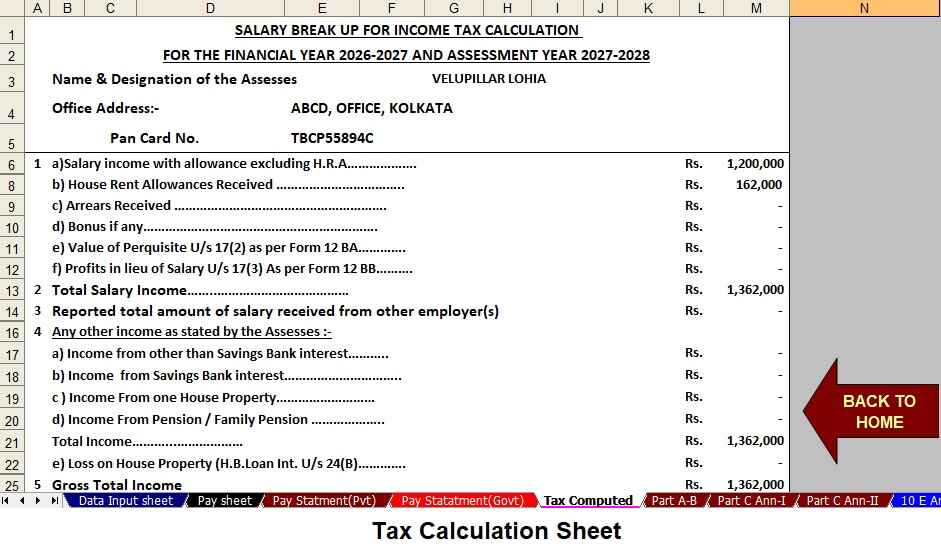
An accurate, all-in-one automatic income tax calculator simplifies tax compliance for both government and non-government employees. As tax rules evolve for F.Y.2026–27, employees require tools that update quickly, compute precisely, and generate the necessary annexures such as Form 10E when applicable. Therefore, an integrated calculator saves time, reduces errors, and improves transparency during salary processing. Below, I explain why such a tool matters, how it handles different employee types, and how it incorporates Form 10E for relief claims under Section 89(1).
Why an all-in-one calculator matters
First, employees face multiple components in salary structures, including basic pay, dearness allowance, transport allowance, HRA, perquisites, bonus, and employer contributions to retirement funds. Second, tax regimes and exemptions have specific conditions that vary between government and non-government roles; consequently, a single-purpose sheet or app often fails to cover both adequately. Third, many taxpayers receive arrears, promotions, or retrospective pay revisions; as a result, they need a mechanism to compute tax on arrears and avoid sudden tax liabilities. Consequently, a unified calculator speeds up processing, cuts mistakes, and enhances transparency in salary handling.
How the calculator handles government and non-government employees
Government employees typically receive pension-related components, specific allowances, and sometimes tax-free portions that differ from non-government packages. Conversely, private-sector employees often have variable pay, incentives, and flexible benefit plans. An effective tool first asks whether the user is a government or non-government employee. Then, it tailors inputs and rules accordingly. When the user selects "government," the calculator adds pension contributions, specific allowances, and government pay-revision rules; when the user selects "non-government," it enables fields for variable incentives, ESOPs, and employer-provided perquisites.
Moreover, the calculator supports both old and new tax regimes. Therefore, users can compare tax outcomes under each regime and choose the most beneficial one. The software automatically applies the correct slab rates, applicable surcharge, health and education cess, and rebate limits for F.Y.2026–27. Additionally, it validates deduction sections such as Section 80C, 80D, 80TTA, and other common provisions according to the latest rules, thereby reducing manual oversight.
Arrears, retrospective pay, and Section 89(1) relief with Form 10E
Often, employers pay arrears or revise pay retrospectively; consequently, employees may face a lump-sum increase in taxable income for the year in which arrears are paid. To avoid unfair taxation, Section 89(1) allows relief for such arrears. However, the Income Tax Department requires a detailed Form 10E to claim this relief electronically. The automatic calculator therefore includes a Form 10E module that prepares required schedules and calculations automatically.
Specifically, the calculator asks for the year of arrears, amount received, and the years to which the arrears pertain. Then, it computes tax on income with and without arrears for each relevant year, determines the difference, and estimates the relief amount under Section 89(1). It then populates the Form 10E template with calculated values and generates a downloadable XML or PDF file ready for electronic filing. As a result, taxpayers can claim relief quickly and correctly, and avoid disputes or reassessments.
Key features that make the tool reliable
- Dynamic rule engine: The calculator updates tax slabs, surcharge, and deduction limits for F.Y.2026–27 and future years without manual recoding.
- Guided input forms: The tool leads users step-by-step, and it validates entries to prevent common errors such as incorrect PAN format or inconsistent dates.
- Regime comparison: It compares old and new tax regimes instantly, and it highlights the most tax-efficient choice.
- Form 10E generator: The module computes Section 89(1) relief and prepares Form 10E for electronic submission.
- Audit trail and export: The calculator stores calculation snapshots and exports Excel, PDF, or XML files for records or employer submission.
- Role-specific templates: It adapts fields based on whether the employee works in the government or private sector.
Security, accuracy, and auditability
Because tax data remains sensitive, the calculator encrypts user data during storage and transmission. Furthermore, it logs all changes and allows users to export an audit-ready report. In addition, the engine runs sanity checks and cross-verifies totals, thereby minimising the risk of under- or over-reporting. Finally, periodic rule updates from tax authorities sync automatically, ensuring the calculator remains compliant as rules change.
Practical workflow: step-by-step
- Step 1: Choose employee type (government or non-government), then select tax regime.
- Step 2: Enter salary break-up, allowances, investments, and any income from other sources.
- Step 3: If arrears apply, provide arrear details and years affected.
- Step 4: Review computed tax, compare regimes, and view Form 10E relief calculation.
- Step 5: Download or e-file Form 10E, and save or export the tax computation report.
Conclusion and next steps
Overall, an automatic all-in-one tax calculator for F.Y.2026–27 streamlines income tax calculations for both government and non-government employees, and it simplifies claiming Section 89(1) relief through Form 10E. By combining dynamic rule updates, secure data handling, and an automated Form 10E generator, the tool reduces compliance risk and saves valuable time. I can draft a template Excel/VBA design for this calculator, outline the Form 10E XML fields, or provide a sample step-by-step user interface flow for developers.
Download the Automatic Income Tax Calculator All in One for Government and Non-Government Employees with Form 10E for the F.Y.2026–27