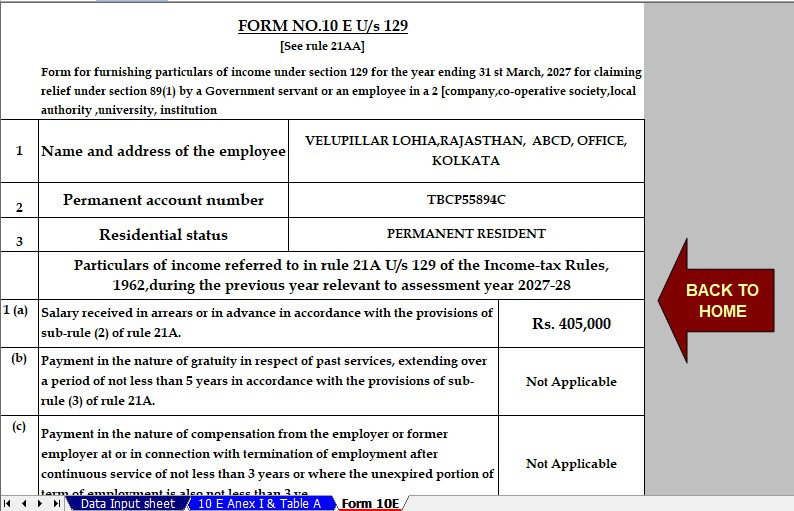
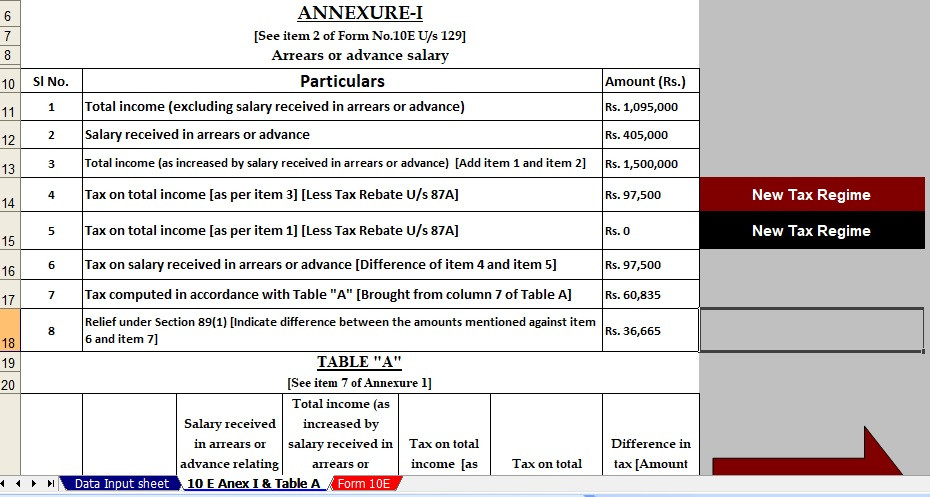
Are you looking for an easy way to prepare Form 10E for the financial year 2026-27? If yes, an automatic Excel-based income tax tool can make the process much easier. Download Automatic Income Tax Form 10E for FY 2026-27 and simplify the calculation of tax relief on salary arrears. Moreover, the right calculator can help you enter previous-year income, arrears, tax details, and other required information with less effort. Therefore, employees can reduce manual calculations and prepare their information more systematically.
What Is Form 10E?
Form 10E is used by eligible taxpayers to claim relief under Section 89(1) of the Income-tax Act when income is received in arrears or in advance. For example, an employee may receive salary arrears in the current financial year even though the amount relates partly to earlier years. Consequently, the additional income can increase the tax payable in the year of receipt.
Form 10E helps calculate the appropriate relief by comparing the tax position with and without the arrears. Thus, it acts like a bridge between the year in which the income was earned and the year in which it was actually received.
Why Is Form 10E Important?
Form 10E is important because salary arrears can sometimes push a taxpayer into a higher tax liability. Therefore, eligible taxpayers may need to calculate relief before claiming it in their income tax return.
Furthermore, completing the calculation carefully can prevent unnecessary tax payments. In addition, maintaining proper records makes the process easier when you prepare your return or respond to a tax-related query later.
Who Can Use Form 10E?
Generally, taxpayers who receive salary, pension, family pension, or certain other eligible income in arrears or advance may need to consider relief under Section 89(1).
However, eligibility depends on the nature of the income and applicable tax provisions. Therefore, you should check the current income-tax rules before submitting the form. Similarly, pensioners and salaried employees should keep their salary statements and arrear details ready.
Section 89(1) and Tax Relief
Section 89(1) provides relief where the timing of income receipt causes an increased tax burden. First, the taxpayer calculates tax on the total income including the arrears. Next, the taxpayer calculates the tax as if the arrears had been received in the years to which they actually relate.
Afterwards, the difference between the relevant tax calculations helps determine the relief. Thus, the calculation considers the impact across different financial years instead of looking only at the current year's income.
How Automatic Form 10E Works
An automatic Excel calculator can simplify several repetitive calculations. First, you enter the required salary and arrear information. Then, the spreadsheet can calculate relevant figures based on its formulas.
Moreover, an automatic format reduces repeated manual calculations. Consequently, it may help users identify errors more easily. Nevertheless, users should verify formulas, tax rates, exemptions, deductions, and other inputs before relying on the final result.
How to Calculate Arrears Relief
The calculation generally involves two broad comparisons. First, calculate the tax liability after including the arrears in the year of actual receipt. Next, calculate the tax liability as though the income had been received in the appropriate earlier years.
Then, compare the relevant tax amounts. The difference represents the potential relief, subject to the applicable provisions. Accordingly, entering each year's income correctly is extremely important.
How to Prepare Form 10E
After completing the calculation, review every figure carefully. Then, prepare Form 10E using the applicable information and procedure.
Do not simply accept an automatically generated result without checking it. Instead, compare the figures with your salary records and supporting documents. Likewise, make sure the financial year and assessment year are correctly selected.
Common Mistakes to Avoid
Several mistakes can affect the calculation. For instance, users may enter the wrong financial year, duplicate an arrear amount, or omit income from an earlier year.
Additionally, incorrect salary figures can produce an incorrect relief amount. Therefore, always cross-check the worksheet against Form 16, salary slips, arrear statements, pension records, and other supporting documents.
Form 10E and Income Tax Return
Form 10E and the income tax return serve different purposes. Form 10E relates to the calculation and claim of relief under Section 89(1), whereas the income tax return reports your overall income, deductions, tax liability, and other required details.
Therefore, completing the Form 10E calculation does not replace filing your income tax return. Instead, the relief calculation supports the relevant claim in the return.
Conclusion
Download Automatic Income Tax Form 10E for FY 2026-27 if you want a structured way to organise arrears-relief calculations. An automatic Excel tool can save time, reduce repetitive work, and make the calculation easier to review. However, accuracy remains essential. Therefore, always verify your entries and use the applicable rules before submitting Form 10E or claiming relief.
Download Automatic Income Tax Form 10E for FY 2026-27